Steps in Submitting papers
For most conferences, papers go through the following steps:
- One of the authors "registers" the paper, providing the paper title, abstract and, if configured for the conference, a set of paper topics and keywords. This registration needs to take place before the registration deadline configured for each track. Chairs can register a paper on behalf of the authors at any time. The person creating the paper entry does not have to be an author; this can happen if an assistant registers a paper. Once the paper has been registered, it is labeled "pending".
- The creator of the paper entry can add any number of authors to the paper. All authors have equal status; there is no special "correspondence author".
- Any of the authors uploads the manuscript for review, typically a PDF file. Once the manuscript has been submitted, the paper becomes "active".
- The paper can be withdrawn by the authors or the chair.
- During the review process, the paper can be labeled "discuss" or "need more reviews". Neither of these designations is visible to authors; they continue to see the paper as "active".
- After decisions are made, the paper is designated as "accepted", "rejected", "minor revision", "major revision" or as the conference-specific accept or reject status.
- The final status becomes visible to authors, along with the reviews, once email notifications have been sent out.
Alternatively, some conferences allow the submission of a short abstract before they review the full manuscript. In that case, the configuration and differs a bit:
- Create two new paper status values (using Conference:Configure, "Paper status"), such as "abstract" and "abstract_accepted".
- Edit the file type "Extended abstract" in Conference:Tracks as appropriate, making sure that "Only for papers that are" is set to "pending" and "abstract".
- Edit the file type "Review manuscript" in Conference:Tracks to include the status values includes "abstract accepted".
- As before, authors submit basic paper information such as title and keywords, and add authors to the paper record. The paper is considered "pending" at that point.
- Authors can then submit a PDF or plain-text abstract, with the maximum page count and deadline configured in the track configuration. The conference needs sets up a new paper status, such as "abstract", that labels papers that have abstracts.
- The chairs can accept and reject abstracts. Authors can submit regular papers for papers with accepted abstracts (e.g., by creating a paper status "abstract accepted"); no further action is permitted for papers that are rejected at that point. Once a PDF file has been submitted, the paper becomes active and can go through another review process ("full paper"), before being accepted or rejected.
Authors of accepted papers can then submit final manuscripts before the final paper deadline.
Listing Papers
You can see all papers under "Papers/List all papers". You can then click on the paper number to see a detailed view.
Manuscript (PDF) Problems
EDAS can detect a variety of common manuscript problems for PDF files, from margin violations to extraneous page headers and font embedding issues. The PDF settings should follow the dimensions given in the author template, but it is helpful to leave authors a little bit of slack on margins, e.g., about 0.1 cm or 0.05 inches, since the PDF file generated by Word or LaTeX sometimes writes into the margins by a small amount. The track configuration allows to configure some of the tests, and whether failing will prevent uploading of the final manuscript.
A typical configuration for IEEE-formatted papers is shown below:
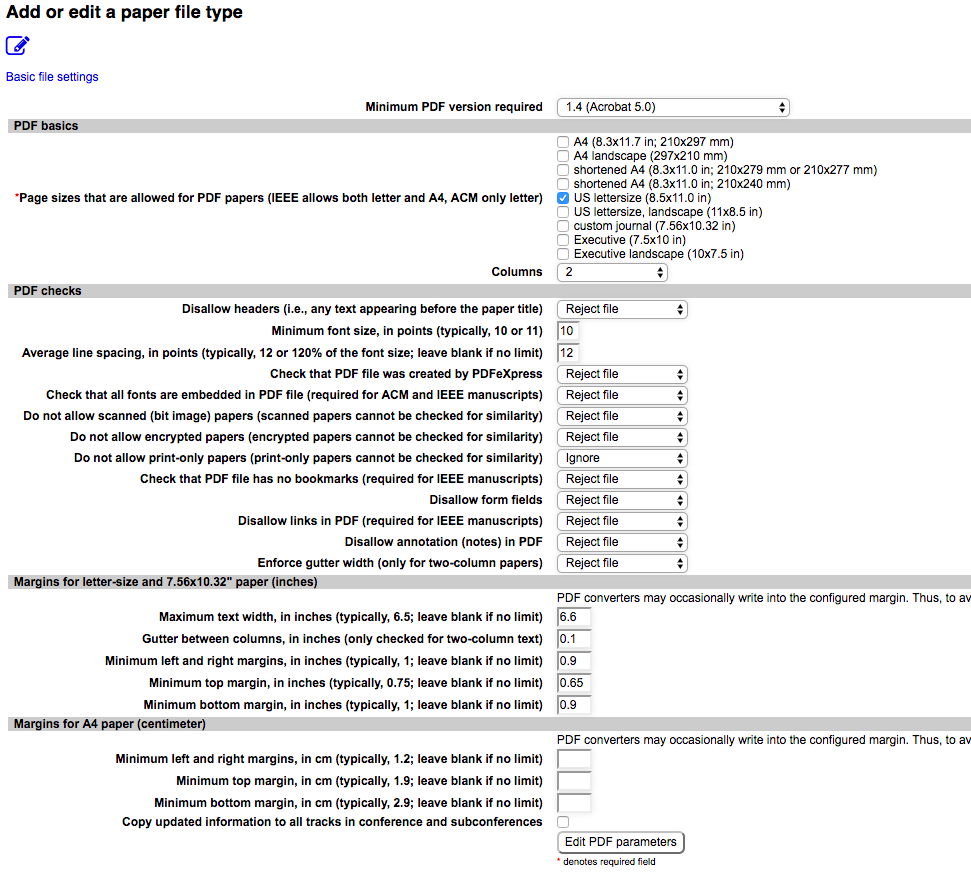
When manuscript problems are detected during upload, the submitting author will see the error message on the web page and all authors get the emailed summary in their submission confirmation email.
If a reviewer reports a manuscript problem, it is immediately reported by email to the appropriate parties, i.e., authors, chair (if configured via Conference/Configure), publication chair (if configured) and the special manuscript problem email address.
Chairs and publication chairs can list the current set of problems for active or accepted papers at Papers:Manuscript problems. If a problem report is a false alarm, the chair or publication chair can clear the error report via the cancellation icon in the manuscript problem list.
Authors can be reminded via the Papers:Remind authors function.
Paper State and Status
Every paper in EDAS is in one of four paper states: active, accepted, rejected or withdrawn. Active papers are in submission or under review. Conferences can create any number of paper status labels for the active, accepted and rejected states. For example, conferences might create "minor revision" and "major revision" status values. (Multiple status values for "withdrawn" probably doesn't make a lot of sense.) By default, EDAS creates the following paper status:
| Status | State | Explanation |
|---|---|---|
| pending | active | Initial status; authors can submit manuscripts if before the track paper submission deadline. |
| active | active | Paper has manuscript or extended abstract and is reviewable. |
| accepted | accepted | Paper has been accepted for presentation or publication. |
| rejected | rejected | Paper has been rejected. |
| noshow | active | This status is created by default only for IEEE conferences. The paper was not presented at the conference; no-show papers can be either in evaluation (default), excused (will be included in the digital library), error (marked erroneously as noshow) and 'dontpublish'. |
| published | accepted | Papers with state 'accepted' will be converted automatically to 'published' after the end of the conference. This will trigger, for example, their inclusion in the docoloc similarity checker and online BibTeX bibliography. |
| withdrawn | withdrawn | The paper was withdrawn by the author, conference chairs or journal editors. |
The paper status is used to restrict what kinds of files can be uploaded. For example, a conference will likely restrict uploading of presentation files to accepted papers.
Each paper status can define whether it triggers an email notification to the authors, via Reviews:Notify authors.
Paper Overview Page
The main paper overview page, accessible from the paper listing or the individual paper selection, shows the basic paper information such as title and abstract as well as reviews. From there, you can upload late or corrected papers, see if the paper has manuscript (PDF) problems, add reviewers, move the paper to a different track or conference, and accept, withdraw or reject the paper. The page also contains reviews and the paper log, identifying all actions that have been taken for the paper.
Prohibited Author List
For IEEE conferences, EDAS checks authors against the prohibited author list. EDAS receives the current list each month and thus, there is no need for chairs to provide the current list.
Similarity Detection
EDAS automatically checks papers for similarity using one of two similarity checkers: IEEE conferences use ithenticate, while non-IEEE conferences use docoloc. (IEEE provides the funding for the use of ithenticate.) Papers are checked after the submission deadline, to avoid re-checking the same paper multiple times as authors update the paper. This also makes it harder for authors intent on plagiarism to try to artificially lower their similarity score by obscuring similarities.