 Instructions for Authors
Submitting a paper via EDAS consists of four steps: logging in or creating an account; registering the paper, adding authors and submitting the manuscript file. We describe the steps in detail below.
For general information on the conference paper submission, the scope of technical papers solicited, the submission process, or paper format, please refer to the Call for Papers. For any other question, such as questions about extending the submission deadline, allowing submission after the deadline or the review status of your paper, please contact the program chairs for your conference. If you have any technical problems with EDAS, please use the "Request help" link on the bottom of every EDAS page.
Please note that EDAS technical support cannot answer questions about your paper, such as whether it has been accepted or when decisions will be made. Any requests for policy exceptions will be referred to the program chairs.
About Paper Formats
Each conference determines what paper file formats, page limits and formatting restrictions are appropriate. Some conferences use "double blind" submission, where authors are asked not to include their name on the paper.
Unfortunately, sometimes the EDAS configuration and the conference submission instructions differ. In those case, authors should contact the conference chairs for advice. Even with manuscript problems, except for page limit violations, the paper will remain in the system, so you do not have to worry about missing the submission deadline.
The PDF checker will sometimes complain about missing embedded fonts or other PDF problems. Authors should consult the EDAS FAQ item (under "Help") on that topic. Authors using LaTeX should consult online guides such as Preparation of Quality PDF Documents.
Logging in to EDAS
Most likely, the conference will have provided authors with a conference-specific submission link, such as https://edas.info/Nxxxxx, where xxxxx will be five digits identifying the conference.
To log in, please enter your email address and password in the corresponding fields of the form on the EDAS login page.
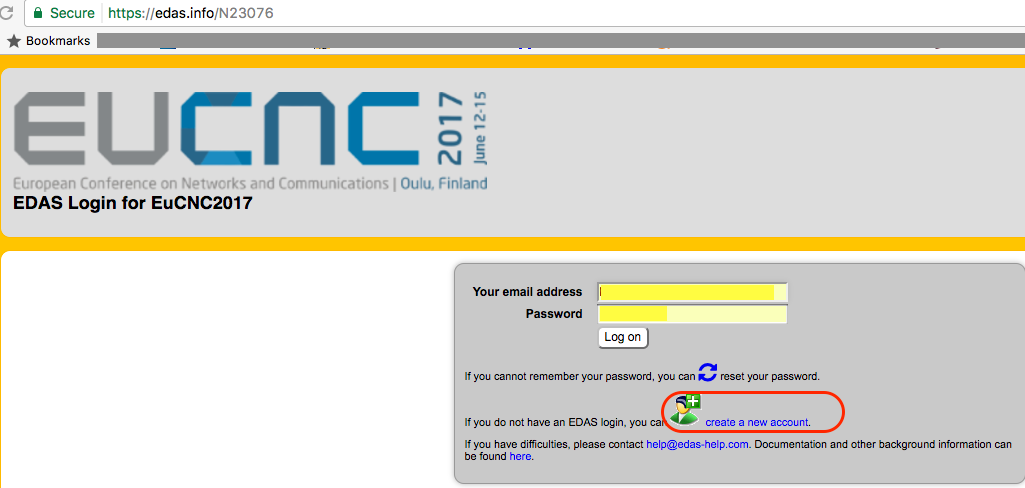
If you do not know whether you have an account on this EDAS system, try entering your email address. EDAS will check whether your account exists or not, and respond accordingly.
If you have an account but forgot your password, please follow the "reset your password" link and EDAS will e-mail a password reset link to you.
If you do not have an account on the EDAS system yet, please follow the detailed instructions.
Registering your Paper
Registering the paper records the paper's title, abstract, topics and authors in EDAS. Before submitting a manuscript for review, the paper has to be registered. After logging in to EDAS, you will see your overall EDAS system homepage.
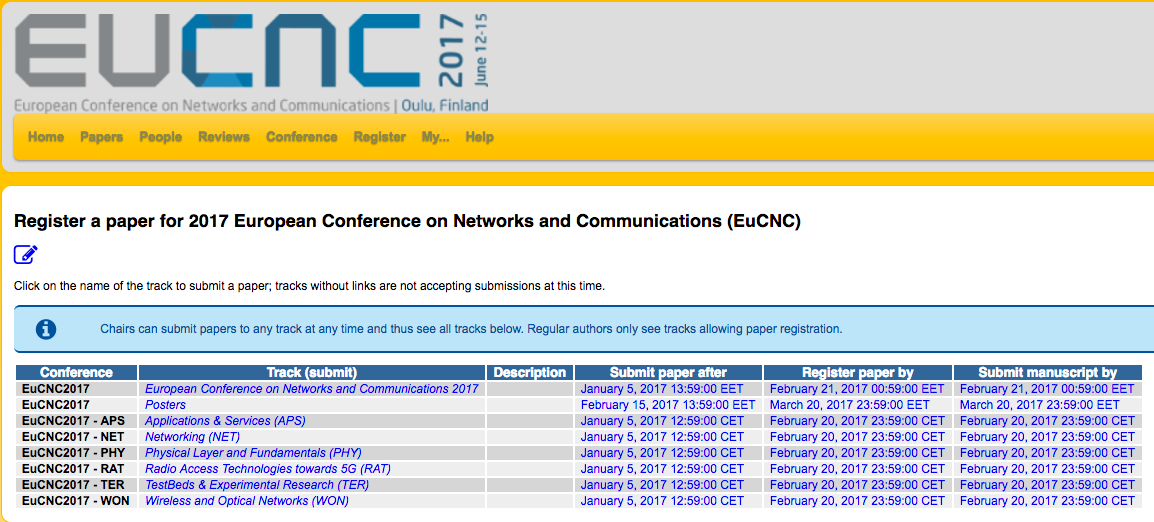
- If you are not using the conference-specific submission link, click to the "Submit paper" tab at the top of the page. Find your conference among the list of conferences accepting submissions. To begin the process of submitting your paper, click on the 'submit' icon for the conference. This will bring you to the conference EDAS homepage.
- If there are multiple tracks for the conference, you will be asked to choose the track by clicking on the track name.
- You should then see the web form for registering your paper
submission. Fill in the form:
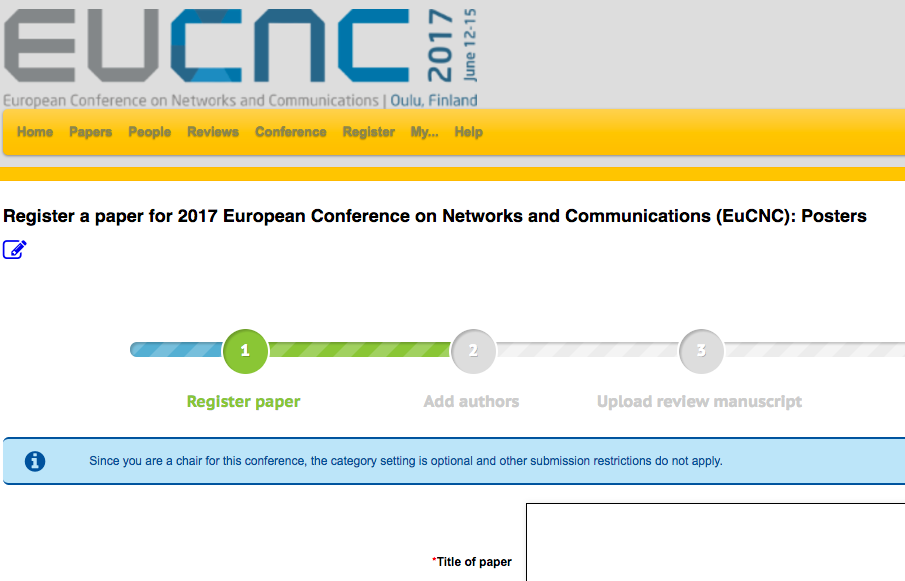
- Enter title and abstract of the paper. Your paper title should NOT be in all upper or all lower-case.
- Check the box "Add yourself as author" if you are indeed an author of the paper. You can add other authors later and you can change the order of authors. Note that some conferences do not allow that you add or delete authors after the submission deadline, to prevent that authors try to defeat the conflict-of-interest detection mechanisms by omitting authors.
- Enter keywords, if configured for your conference.
- Select the topics from the list of paper topics that best classify your paper. (Not all conferences have defined topics. Some conferences require that papers list a minimum number of topics and restrict the maximum number of topics.)
- Once you have all the information filled in, click on the "Submit" button at the bottom of the page. This will lead to a page that acknowledges your paper's registration and allows you to add authors. A confirmation e-mail will be sent to you.
Adding Authors
Add authors by following the link after registering the paper or going to your EDAS home page and following the link for your paper. Note that your paper has to have at least one author before you can submit a manuscript.
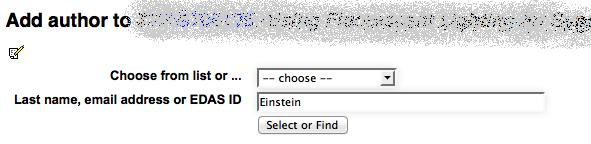
In the form above, enter each author using either their EDAS identifier, email address or their last name. Each author must be registered in EDAS. You will then be prompted to choose among existing EDAS entries:
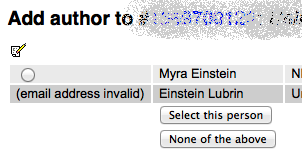
If an author is not yet registered in EDAS, you will be prompted for the information (name, email address, affiliations, ...) to register them and they will receive an email with their password.
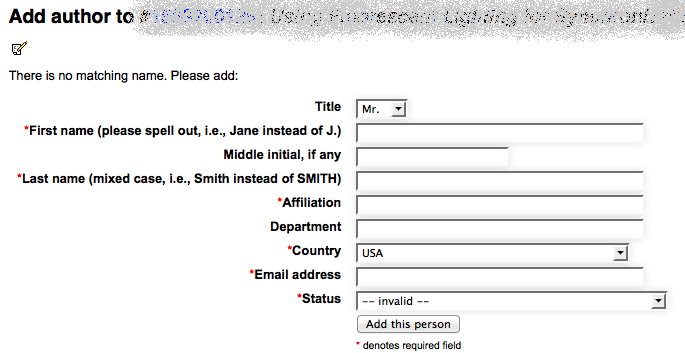
You cannot add records for authors that already have EDAS accounts. There are no correspondence authors, as all authors are notified by email after their paper has been reviewed.
Submitting and Uploading your Paper
After registering your paper submission, you must upload your actual paper, typically a PDF file. (Each conference decides which paper formats are acceptable.)
To upload your paper right after registering your submission, simply follow the EDAS instructions on the acknowledgement page.
Alternatively, you can upload your paper later from your EDAS homepage. From there, you can upload your paper by clicking on the icon in the line that shows your paper's basic information.
After you return to your EDAS homepage, you will see your uploaded paper. If you click on the paper number, you will see the paper details. If you click on the paper under "Document (show)", you will see the PDF version that you uploaded.
From your EDAS homepage, you can see the status of your paper. Initially, when you are registered but yet to upload your paper, EDAS will highlight the paper with white color as pending, to show that no version of your paper PDF file has been uploaded yet. After your paper has been uploaded, the color indicating the status will change to yellow ("active (has manuscript)"), and a confirmation e-mail will be sent to all authors.
Revising your Paper or Account
After you have submitted your paper, you can revise your submission at any time before the submission deadline. To revise your submission, go to your EDAS homepage. Just upload a new PDF version the same way you did already for the previous version. Please do not register and submit a new version as if it were a separate new paper, since this will duplicate the paper registration records.
Revising Your Personal Information (Profile)
You can also revise your own EDAS account information from your EDAS homepage. To do so, click on the tab at the top to My...:My profile.